WPForms Pro
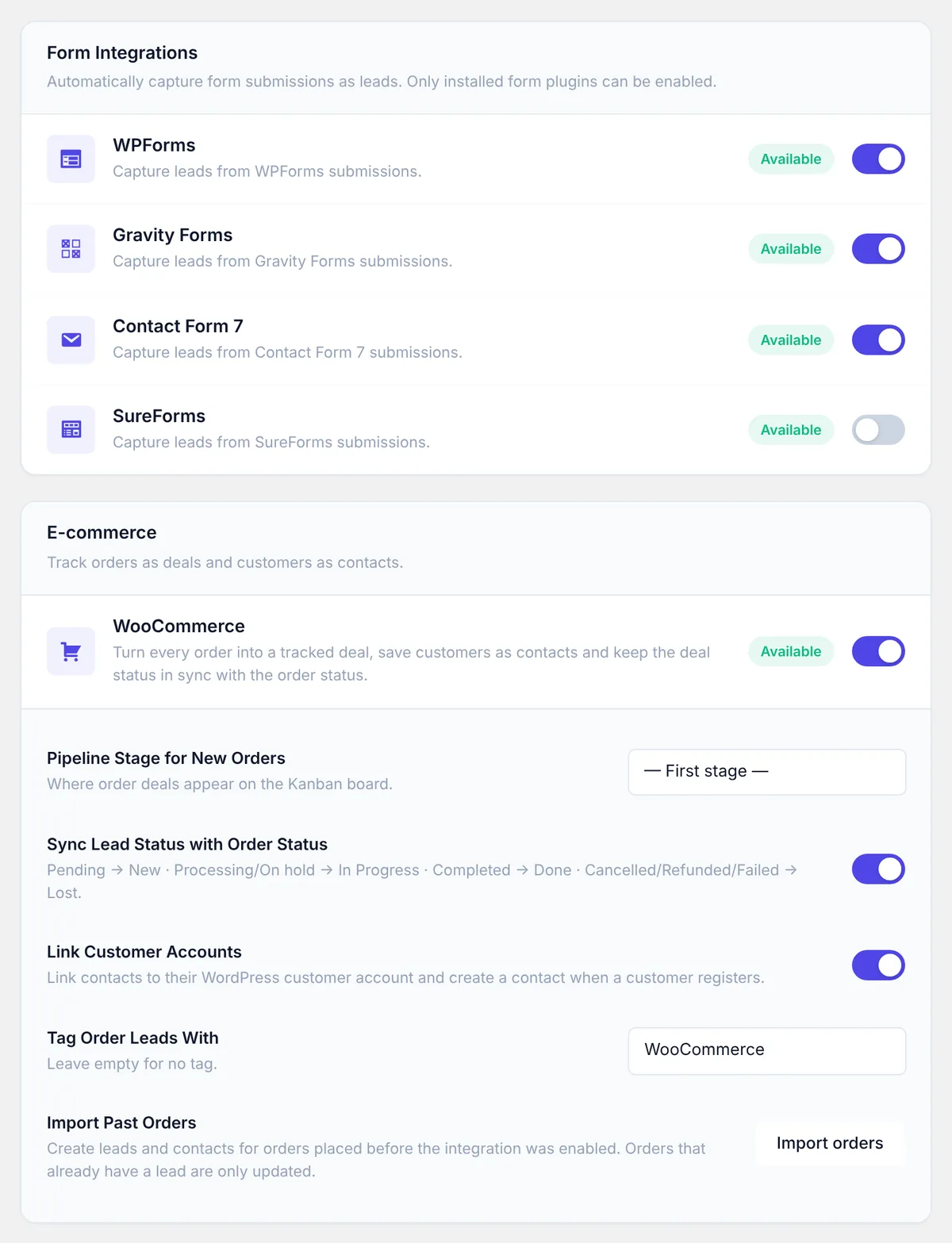
Every WPForms entry becomes a lead with its contact. Works with both WPForms Lite and WPForms Pro.
- Name, email & phone fields detected
- Form ID stored on the lead
LeadTractor captures submissions from your form plugins and orders from WooCommerce automatically — and connects to anything else through Zapier, Make, n8n, a REST API and webhooks.
Turn each integration on or off individually. LeadTractor only hooks into plugins that are actually installed, and maps name, email, phone, company, subject and message for you — every other field is saved as submission data.
Every WPForms entry becomes a lead with its contact. Works with both WPForms Lite and WPForms Pro.
Capture Gravity Forms entries, including Name (first/last) and Email field types, straight into your pipeline.
Never lose a Contact Form 7 message in an inbox again. Standard tags like your-name, your-email and your-message are mapped automatically.
SureForms submissions flow into LeadTractor the moment they're sent, with every answer saved on the lead.
Orders become deals linked to the customer. Status and value stay in sync with the order, and contacts show their purchase history.
Save every new registration on your site as a contact, linked to the user account and kept in sync when they update their profile.
Each integration shows whether its plugin is installed, and only installed plugins can be switched on. For WooCommerce you also choose the stage and tag for order deals, keep statuses in sync and import past orders.
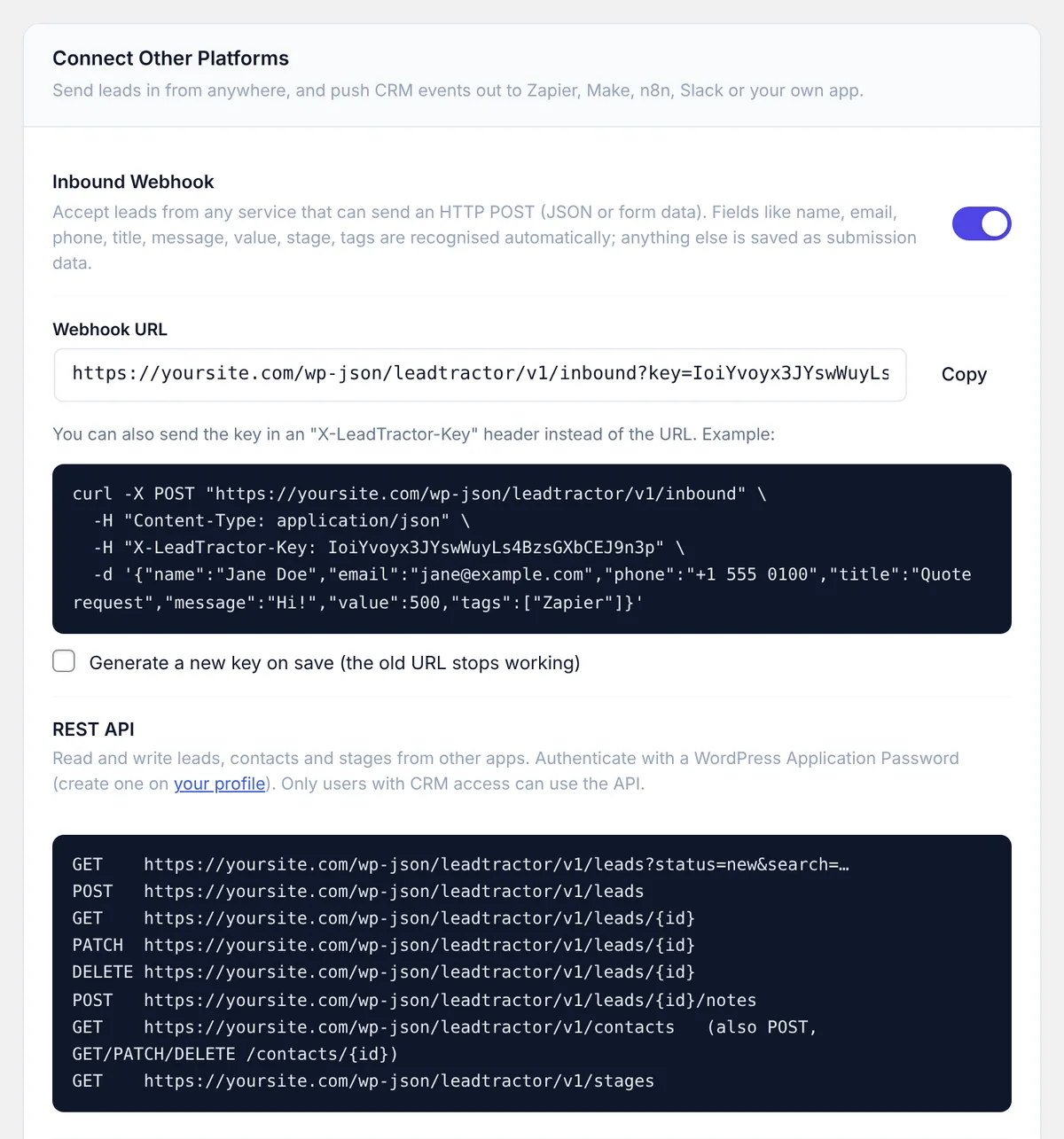
Facebook Lead Ads, Typeform, Calendly, a landing-page builder, your own SaaS — if it can send or receive an HTTP request, it can talk to LeadTractor.
Enable it in Settings → Connect and paste the URL into a "Webhooks by Zapier", Make HTTP or n8n HTTP Request step. Send JSON or form data — name, email, phone, title, message, value, stage and tags are recognised, and other labels like "Your Email" are detected automatically.
curl -X POST "https://yoursite.com/wp-json/leadtractor/v1/inbound" \
  -H "Content-Type: application/json" \
  -H "X-LeadTractor-Key: YOUR_SECRET_KEY" \
  -d '{"name":"Jane Doe","email":"jane@example.com",
       "title":"Quote request","value":500,"tags":["Zapier"]}'
Add one or more URLs and pick the events. LeadTractor POSTs the full lead or contact as JSON, signed with X-LeadTractor-Signature: sha256=… (HMAC-SHA256 of the body with your secret). A "Send test event" button checks your endpoint.
lead.createdlead.updatedlead.status_changedlead.stage_changedlead.deletedcontact.createdcontact.updated
// Verify a LeadTractor webhook (Node.js)
const expected = 'sha256=' + crypto
  .createHmac('sha256', process.env.LT_SECRET)
  .update(rawBody).digest('hex');
if (req.headers['x-leadtractor-signature'] !== expected) {
  return res.status(401).end();
}
Base URL /wp-json/leadtractor/v1. Authenticate with a WordPress Application Password for a user who has CRM access.
| Method | Endpoint | What it does |
|---|---|---|
| GET | /leads | List leads. Filters: search, status, stage_id, tag_id, contact_id, source, page, per_page. |
| POST | /leads | Create a lead (and its contact). |
| GET | /leads/{id} | Get one lead with contact, tags, value and submission data. |
| PATCH | /leads/{id} | Update status, stage, value, priority, follow-up, owner or tags. |
| DELETE | /leads/{id} | Delete a lead. |
| POST | /leads/{id}/notes | Add a note to a lead. |
| GET POST | /contacts | List or create contacts. |
| GET PATCH DEL | /contacts/{id} | Read (with their leads), update or delete a contact. |
| GET | /stages | Pipeline stages with lead counts and values. |
Switch on the inbound webhook to get your private URL and key, copy a ready-made cURL example, and see every REST endpoint with your site’s address filled in. Outgoing webhooks, their events and the signing secret live on the same screen.
Create leads from any plugin or theme with leadtractor_create_lead() — or fire do_action( 'leadtractor/create_lead', $args ) so there's no hard dependency. React to CRM events with actions and filters.
leadtractor/lead_created, lead_updated, lead_status_changed, lead_stage_changed, lead_assignedleadtractor/contact_created, contact_updatedpre_create_lead (reject spam), form_submission, woocommerce/status_map, webhook_payload, notification_email// Post to Slack when a deal is won add_action( 'leadtractor/lead_status_changed', function ( $lead_id, $new, $old ) { if ( 'done' !== $new ) return; $lead = LeadTractor_Lead::get( $lead_id ); wp_remote_post( SLACK_WEBHOOK_URL, array( 'body' => wp_json_encode( array( 'text' => 'Deal won: ' . $lead->title, ) ), ) ); }, 10, 3 );
Install LeadTractor Pro, go to LeadTractor → Settings and switch on Contact Form 7. Every submission from then on is saved as a lead with its contact, and all submitted fields are stored on the lead.
Yes. Developers can call leadtractor_create_lead() from the form plugin's submission hook. Without code, send the form to the LeadTractor inbound webhook from Zapier, Make or n8n — field names such as name, email and phone are detected automatically.
Each outgoing webhook request carries an X-LeadTractor-Signature header: sha256= followed by the HMAC-SHA256 of the raw request body using your signing secret from Settings → Connect.
Start with the free CRM today and switch on integrations whenever you're ready.